BMW · MINI · ROLLS-ROYCE // NBT EVO
BMW NBT EVO ID5/ID6 Native Android Auto Activation
Android Auto. Original BMW iDrive. No extra hardware.
BMW never officially introduced Android Auto for its NBT EVO ID5 and ID6 infotainment systems. Until now, Android users have generally needed aftermarket interfaces or replacement displays.
Jono's Vehicle Solutions now offers native Android Auto activation for compatible BMW, MINI and Rolls-Royce vehicles fitted with original NBT EVO ID5/ID6 head units.
Enjoy Google Maps, Waze, Spotify, YouTube Music, calls, messaging and Google Assistant directly through your original iDrive system. No MMI box. No aftermarket screen. No AUX connection.
- Native Android Auto
- Wireless & USB Connectivity
- Original Factory Controls
- No Additional Interface
- Remote Activation Available
- BMW / MINI Specialists
Compatibility is confirmed from your vehicle's installed head unit — not from the model or registration alone.
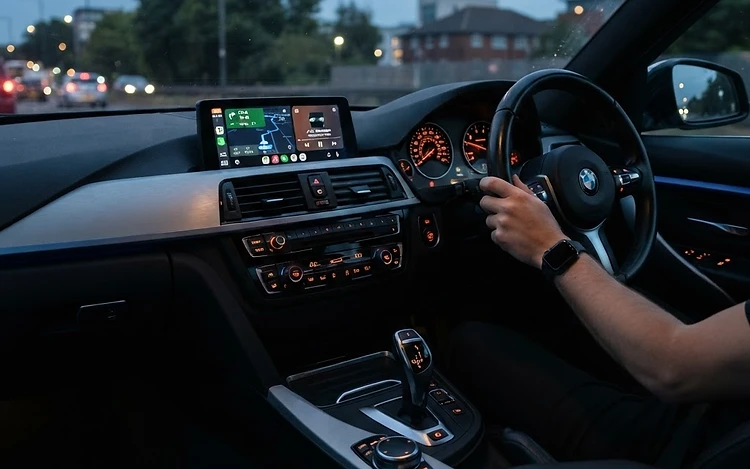
Illustration of an original NBT EVO ID6 display running Android Auto.
THE TECHNOLOGY
What Is Native Android Auto on BMW NBT EVO?
Unlike conventional aftermarket Android Auto systems, this solution operates through the original NBT EVO head unit. Android Auto becomes accessible through the factory infotainment system without replacing the screen or installing an additional multimedia interface.
Native iDrive Integration
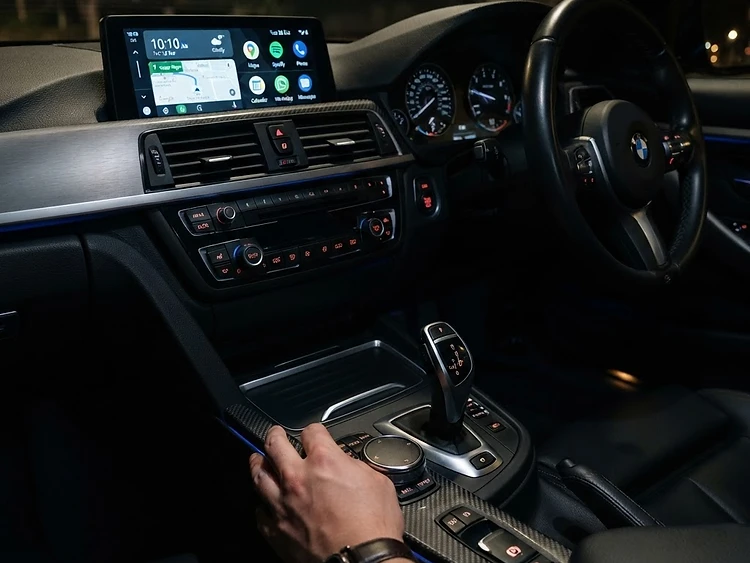
Android Auto operates within the original BMW NBT EVO infotainment environment.
Wireless or Wired Connection
Connect an Android smartphone automatically over WiFi, or use a compatible USB cable. The connection method is selected through the iDrive menu.
No Additional Hardware
No MMI box, aftermarket display, AUX audio interface or additional multimedia module is required for the activation.
Original Factory Controls
Continue using the iDrive controller, the factory touchscreen where fitted, and supported steering wheel controls.
Original Factory Audio
Navigation instructions, calls and music play through the vehicle's existing audio system.
Android Auto Applications
Google Maps, Waze, Spotify, YouTube Music, WhatsApp messaging, telephone calls and Google Assistant.
Factory Features Retained
Existing BMW navigation, radio, DAB where equipped, Bluetooth, vehicle settings and Apple CarPlay remain available.
BACK STORY
Why Didn't BMW Include Android Auto on NBT EVO?
BMW introduced NBT EVO with iDrive 5 and iDrive 6 during the mid-2010s. Although Apple CarPlay became available on compatible systems, BMW never officially introduced Android Auto for NBT EVO ID5/ID6.
BMW's official Android Auto support arrived with later-generation iDrive 7 infotainment systems. This meant many BMW, MINI and Rolls-Royce owners with modern factory infotainment displays could not use Android Auto without aftermarket modifications.
Native Android Auto activation provides an alternative for compatible NBT EVO systems while retaining the original factory display and controls.

COMPARISON
Native Android Auto vs Aftermarket Android Auto Systems
| Feature | Native Android Auto | MMI Interface | Aftermarket Screen |
|---|---|---|---|
| Original BMW screen retained | Yes | Yes | Not always |
| Additional multimedia hardware | No | Yes | Yes |
| Original iDrive integration | Yes | Partial | Varies |
| Factory audio integration | Yes | Varies | Varies |
| Wireless connectivity | Yes, with WiFi antenna | Model dependent | Model dependent |
| Factory appearance | Retained | Retained | May change |
| Dashboard disassembly | Not normally required | Usually required | Usually required |
| Remote software activation | Available | No | No |
Original BMW screen retained
- Native
- Yes
- MMI box
- Yes
- Screen
- Not always
Additional multimedia hardware
- Native
- No
- MMI box
- Yes
- Screen
- Yes
Original iDrive integration
- Native
- Yes
- MMI box
- Partial
- Screen
- Varies
Factory audio integration
- Native
- Yes
- MMI box
- Varies
- Screen
- Varies
Wireless connectivity
- Native
- Yes, with WiFi antenna
- MMI box
- Model dependent
- Screen
- Model dependent
Factory appearance
- Native
- Retained
- MMI box
- Retained
- Screen
- May change
Dashboard disassembly
- Native
- Not normally required
- MMI box
- Usually required
- Screen
- Usually required
Remote software activation
- Native
- Available
- MMI box
- No
- Screen
- No
Native integration avoids the additional interface hardware commonly required by aftermarket alternatives. There is no MMI module behind the dashboard, no separate display, and no AUX audio path — Android Auto is presented by the head unit the car was built with.
COMPATIBILITY
Compatible BMW, MINI & Rolls-Royce Vehicles
Compatibility depends on the vehicle's actual installed head unit — not simply its model, registration year or chassis code. Only vehicles fitted with an original BMW NBT EVO ID5 or ID6 head unit are potentially compatible.
| Vehicle range | Chassis |
|---|---|
| BMW 1 / 2 Series | F20, F21, F22, F23, F87 M2 |
| BMW 3 / 4 Series | F30, F31, F34, F80 M3, F32, F33, F36, F82/F83 M4 |
| BMW 5 / 6 / 7 Series | G30, G31, G32 GT, F06, F12, F13, G11, G12 |
| BMW X Series | F48 X1, F39 X2, F25 X3, F26 X4, G01 X3, G02 X4, F15 X5, F16 X6, F85/F86 M |
| BMW i Series | i3, i8 |
| MINI | F54 Clubman, F55, F56, F57, F60 Countryman |
| Rolls-Royce | Models equipped with original NBT EVO ID5/ID6 |
The chassis listed are examples and are not guaranteed to have a compatible head unit.
Not compatible
The following systems are not supported by this service:
- BMW CIC
- Original NBT (non-EVO)
- NBT EVO ID4
- ENTRYNAV2
- iDrive 7 / MGU
- iDrive 8
- Aftermarket Android head units
- Third-party infotainment systems
Only original NBT EVO ID5/ID6 systems are supported.
CONNECTION
Wireless Android Auto or USB Android Auto — Your Choice
Wireless Android Auto
Compatible vehicles equipped with the required NBT EVO WiFi antenna can connect to Android Auto wirelessly. Once configured, the smartphone can reconnect automatically when entering the vehicle.
USB Android Auto
Vehicles without a suitable WiFi antenna can use Android Auto through a compatible USB connection. The connection mode is selected through the iDrive menu.
Important: a missing WiFi antenna does not necessarily prevent Android Auto activation. USB connectivity provides an alternative without needing to remove the head unit to install an antenna.
JVS REMOTE CONNECT
Activate Android Auto Remotely — No Workshop Visit Required
Jono's Vehicle Solutions offers remote activation for compatible BMW and MINI vehicles through our JVS Remote Connect platform. Depending on compatibility and the agreed installation procedure, the activation can be completed without travelling to our Telford workshop.
- 1
Compatibility Check
Submit your vehicle registration or VIN and photographs of your iDrive system.
- 2
Quotation
JVS confirms suitability and provides a quotation, the requirements and any relevant terms.
- 3
Booking & Payment
Once accepted, you complete payment and agree an installation appointment.
- 4
Prepare Your Equipment
Connect the ENET cable between the vehicle and your Windows laptop. Ensure the vehicle has stable power and the laptop has a reliable internet connection.
- 5
Remote Activation
At the scheduled appointment, JVS connects through the JVS Remote Connect platform and carries out the agreed activation procedure.
- 6
Verification
The Android Auto installation and relevant functionality are checked, and you receive guidance on connecting your smartphone.
What you'll need
- Compatible NBT EVO ID5/ID6 head unit
- Windows laptop
- BMW-compatible ENET cable
- Stable internet connection
- Suitable vehicle battery support throughout the procedure
- Compatible Android smartphone
- An agreed appointment with Jono's Vehicle Solutions
This is not an automated or instant process. All bookings and activations are subject to compatibility and appointment availability.
WORKSHOP OPTION
Prefer to Visit Our Workshop?
Customers can also enquire about having Android Auto activated at our workshop in Telford, Shropshire. Jono's Vehicle Solutions specialises in BMW and MINI diagnostics, programming, coding, software services and retrofits.
Unit 23A, Trench Lock 3, Telford, Shropshire, TF1 5ST
RELATED SERVICES
BMW & MINI services that work alongside this
Activation is often combined with coding, retrofit or head unit work — all carried out in-house.
APPLE CARPLAY
BMW Apple CarPlay Activation
CarPlay activated on your factory screen, at the workshop or remotely.
Read moreNBT EVO
BMW NBT EVO CarPlay Activation
The NBT EVO head unit family explained, including what else it supports.
Read moreANDROID AUTO
BMW Android Auto Retrofit
For pre-iDrive 7 cars, the genuine MGU hardware route — assessed honestly.
Read moreMINI
MINI Android Auto Compatibility
Which MINIs can run Android Auto, and the options when yours can't.
Read moreCODING & SOFTWARE
BMW Coding Services
Feature activation, configuration and vehicle coding with specialist equipment.
Read moreRETROFITS
BMW Retrofits & Upgrades
Genuine hardware retrofits, installed and coded like a factory fitment.
Read moreHEAD UNIT REPAIR
BMW NBT Head Unit Failure
Boot loops, black screens and software faults diagnosed and repaired.
Read moreSOFTWARE RECOVERY
iDrive Boot Loop Repair
Failed updates and corrupted iDrive software recovered properly.
Read moreSPECIALIST SERVICE
BMW & MINI Specialist
Diagnostics, programming, coding and retrofits in Telford, Shropshire.
Read moreLooking for factory Android Auto on a newer car? See BMW Android Auto activation for iDrive 7 / MGU vehicles, or browse all BMW & MINI services.
FAQ
Android Auto activation — common questions
ENQUIRY
Check Your BMW or MINI for Android Auto Compatibility
Send your vehicle details and, if you can, photographs of your iDrive screen and head unit version screen. We'll confirm whether your car has a compatible NBT EVO ID5/ID6 system before quoting.
Jono's Vehicle Solutions is an independent specialist. This is an aftermarket software activation for original BMW infotainment hardware, not an official BMW feature, and we are not affiliated with BMW Group.
NEXT STEP
Having this problem with your vehicle?
Contact Jono's Vehicle Solutions for advanced diagnostics and fault finding in Telford, Shropshire. You don't need to know exactly what's wrong — describe the symptoms and we'll take it from there.